
Brilean Phishing Test
Security awareness exercise
Hover over links to see the actual URL before clicking. Be wary of mismatched or suspicious-looking URLs.
Be cautious of unexpected attachments, especially ones requiring you to enable macros or scripts.
If you ever think that an email is suspicious, tell a superior and report it in the email client. It is better to err on the side of caution. Forward it to security@brilean.com.
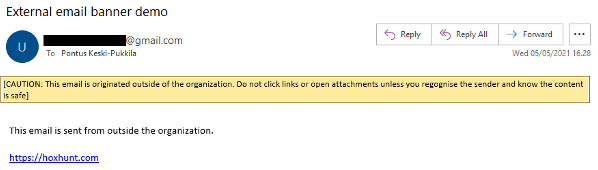
At Brilean, any email from an external sender should have a caution message at the very top. Do you see this banner?
Ensure your operating system and antivirus software are up to date to guard against vulnerabilities.
Did anything look out of the ordinary? Did you recognize the sender's address? Was it similar but not the same as an official email? The official Brilean email for the security team is:
security@brilean.com